
Overview
In this case study, we try to analyze the problems of software developers in the process of distributing and delivering software, produce user interface and user experience design solutions on the IntegraCI platform that answer problems based on the problems found, and get the results of evaluating user interface design and user experience on the IntegraCI platform. The results of this study are the interface design and user experience of the IntegraCI platform as an automation platform in the software distribution and delivery process, and the IntegraCI platform design design has been tested by getting a usability level of 93.62% (very good).
Keyword
Software developer, CICD, User-Centered Design, Usability, ISO 9241-210
Company
Divistant, Product
Background
According to data from the U.S. Bureau of Labor Statistics, the demand for workers in the field of software developers, quality assurance analysts, and testers will increase by 22% until 2030. Meanwhile, many companies are competing with each other to digitalize starting from the company's internal system to customer service. In this case, software developers are required to pay attention to the flexibility, effectiveness, and efficiency of software development, while still producing quality products. Moreover, software developers also experience an increase in the complexity of understanding the technology used in developing a software. According to Mäntylä & Vanhanen, deploying software has many processes, from activities related to interacting with users, creating integrations, configuring, installing, to testing the software.
From my research, software developers experience difficulties in distributing and delivering software because they have to learn how to distribute and deliver software with more and more complex technologies. Although there are automation platforms; such as Jenkins, GitlabCI, CircleCI; software developers find it complicated to do the configuration so that the facilities provided by the platform are not maximally utilized.. Many things affect why these platforms are not widely used by software developers, such as price, flexibility, and the need for complicated configurations in using these platforms so that developers still do not utilize them. One of these complexities is the configuration of a .yaml file that defines a collection of jobs with restrictions on how and when the job should be run.
Problem

What exactly users need ?
We conducted user interviews with potential users to discuss the problems encountered during the traditional software distribution and delivery process, the solutions needed by participants to overcome these problems, and suggestions from participants to overcome the problems they experienced.
• Problem 1
Difficulties in the software development process experienced by software developers in the process of distributing and delivering software to users.
• Problem 2
The increasing complexity of understanding the technology used in developing a software, so it takes longer in the process.
• Problem 3
In addition to developing software, software developers also have to learn how to distribute and deliver software to users so that the focus of software developers in developing software is not carried out optimally.
• Problem 4
There is already a platform regarding the automation process in the software distribution and delivery process, but software developers find it complicated to do the configuration so that the facilities provided by the platform are not maximally utilized.


Goals
To provide a clear direction for the design process, we define goals of our current initiatives
Goals 1
How might we help the software development process difficulties experienced by software developers?
Goals 2
How might we help developers automate the software distribution and delivery process?
Persona

The Users

Based on the analysis conducted in the early stages, our platform is intended for users, such as
Software developer who has knowledge about continuous integration and continuous delivery (CI/CD)
Software developer who has been involved in several projects by implementing DevOps automation tools, such as CircleCI, Code Magic, Jenkins, Visual Studio App Center, Github Action and so on
Competitor Analysis

Other Automation Software
To understand the user's tasks and goals, we analyzed the user's activities against a set of tasks on platforms that the user has used before. We decided to choose GitlabCI, CirlceCI, and Jenkins as the boundaries of platforms that users have used before.


Gitlab CI
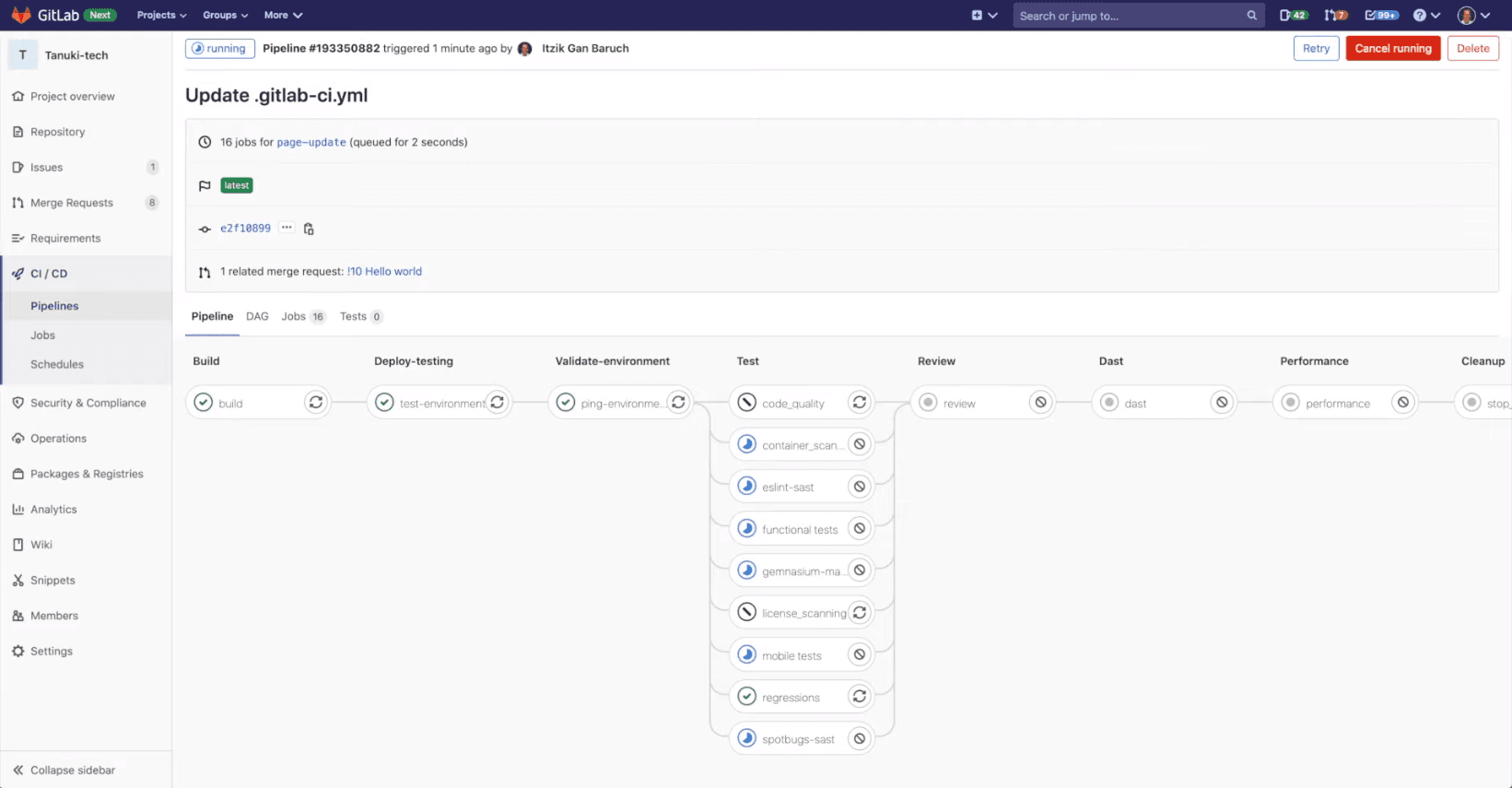
The task involves a series of steps for setting up Continuous Integration/Continuous Deployment (CICD) on Gitlab. First, users must meet prerequisites, including having a project on Gitlab designated for CICD and an active runner functioning as an agent for CICD execution. Next, they need to create a .gitlab-ci.yml file, specifying the job structure, sequence, and runner decisions for specific conditions. Once the configuration is complete, users initiate the pipelines by selecting the "Commit changes" button. Finally, they can monitor the status of pipelines and individual jobs by navigating to the CI/CD menu, specifically under Pipelines, where the stages defined in the .gitlab-ci.yaml file are displayed, and they can access job details by selecting the respective job names.
CircleCI
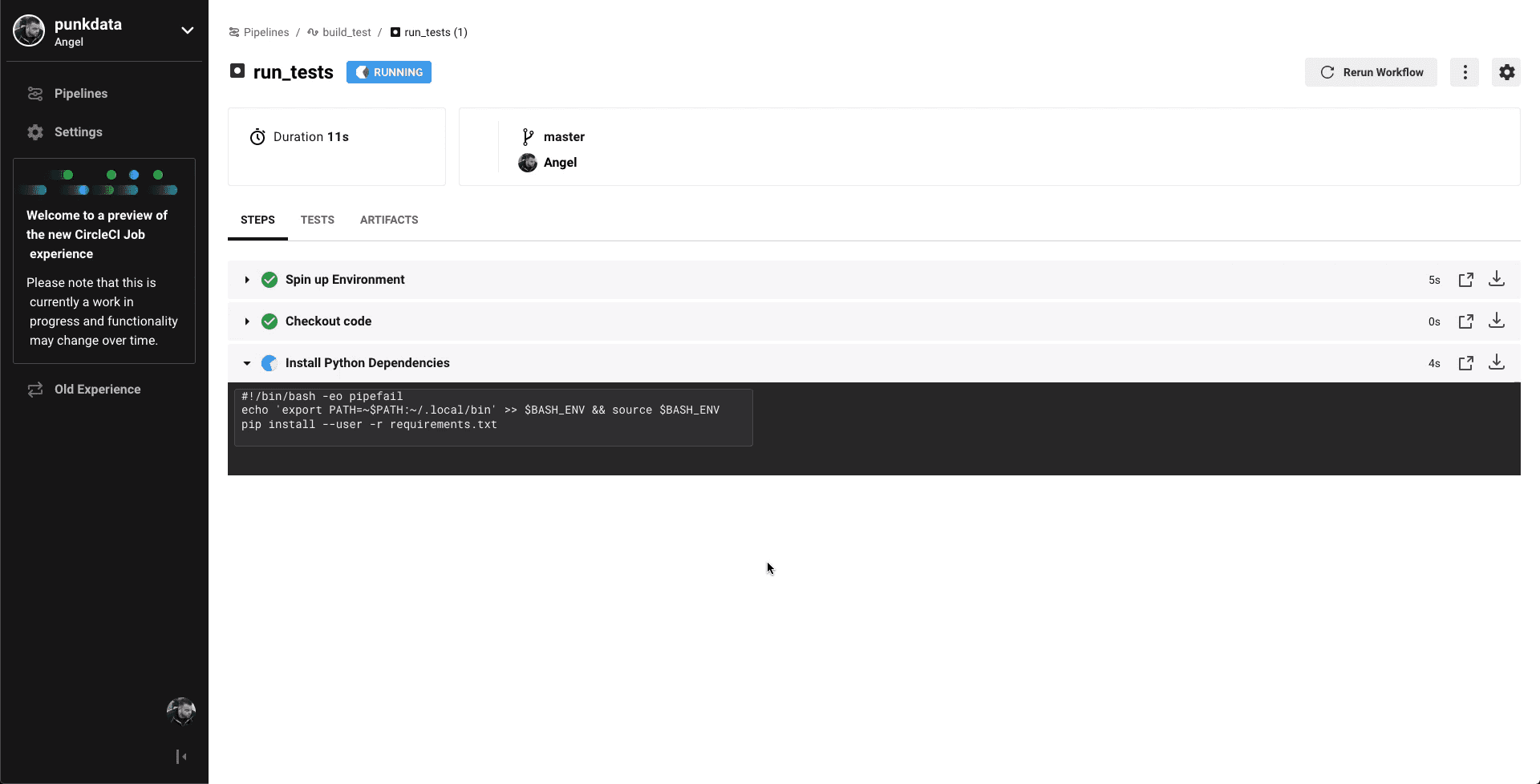
The tasks performed on CircleCI involve a series of steps. First, users can sign up or log in using Github, Bitbucket, or Gitlab accounts, initiating an authentication process and granting these platforms access to their stored code. Then, they connect their code by selecting a project corresponding to a previously authorized repository. Configuration is carried out by directly editing the provided .yaml template, and the user proceeds to run the config.yaml code by clicking "Commit and Run," generating a .circleci/config.yml file in the root repository. Finally, users can review the results of the structured pipeline, assessing the success levels of various workflow steps, environments, code checkouts, and executed code artifacts.
Jenkins
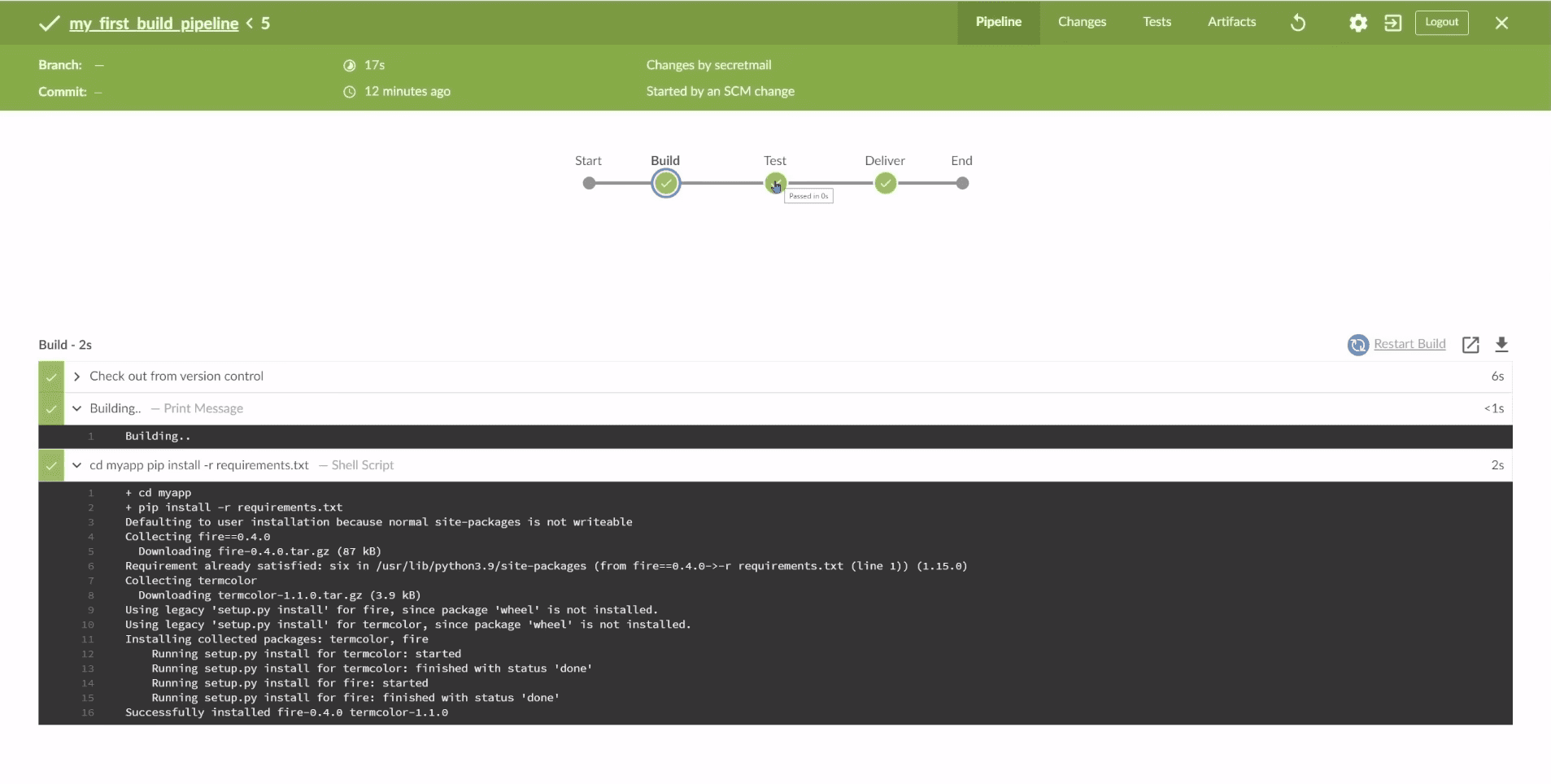
Before implementing CICD with Jenkins, users need to install Jenkins on their local machine or a remote computer because Jenkins is a Java-based automation server that runs as a standalone application in its own process. The process involves the following steps: First, users prepare a repository containing the project they want to integrate into a version control system platform like Github, adding a file named Jenkinsfile to the repository. Next, they create and structure the Jenkinsfile to define the pipeline instructions and processes. After committing the Jenkinsfile to the repository and copying the repository's URL, users open Jenkins, select "New item," and create a new pipeline, pasting the previously copied repository URL in the Github project field, enabling "Github hook trigger for GITScm polling," and specifying the Jenkinsfile's script path. Configuration is saved, and users proceed to configure a webhook in Github, providing the Jenkins URL, setting the content type, and selecting the desired events to trigger. Finally, users run and trigger the Jenkins CICD Pipeline Job, initiating the initial build data on Jenkins, and they can test the pipeline by adding a dummy file to the repository via Github, which will result in a new build entry in Jenkins upon committing the file.
User Task

The guide for users to do some tasks
We created a user task scenario based on the user's experience in overcoming problems in the process of distributing and delivering software traditionally and through other competing platforms. The user tasks will be useful as a reference in designing a design solution.
1
Login
2
Create a new application project
3
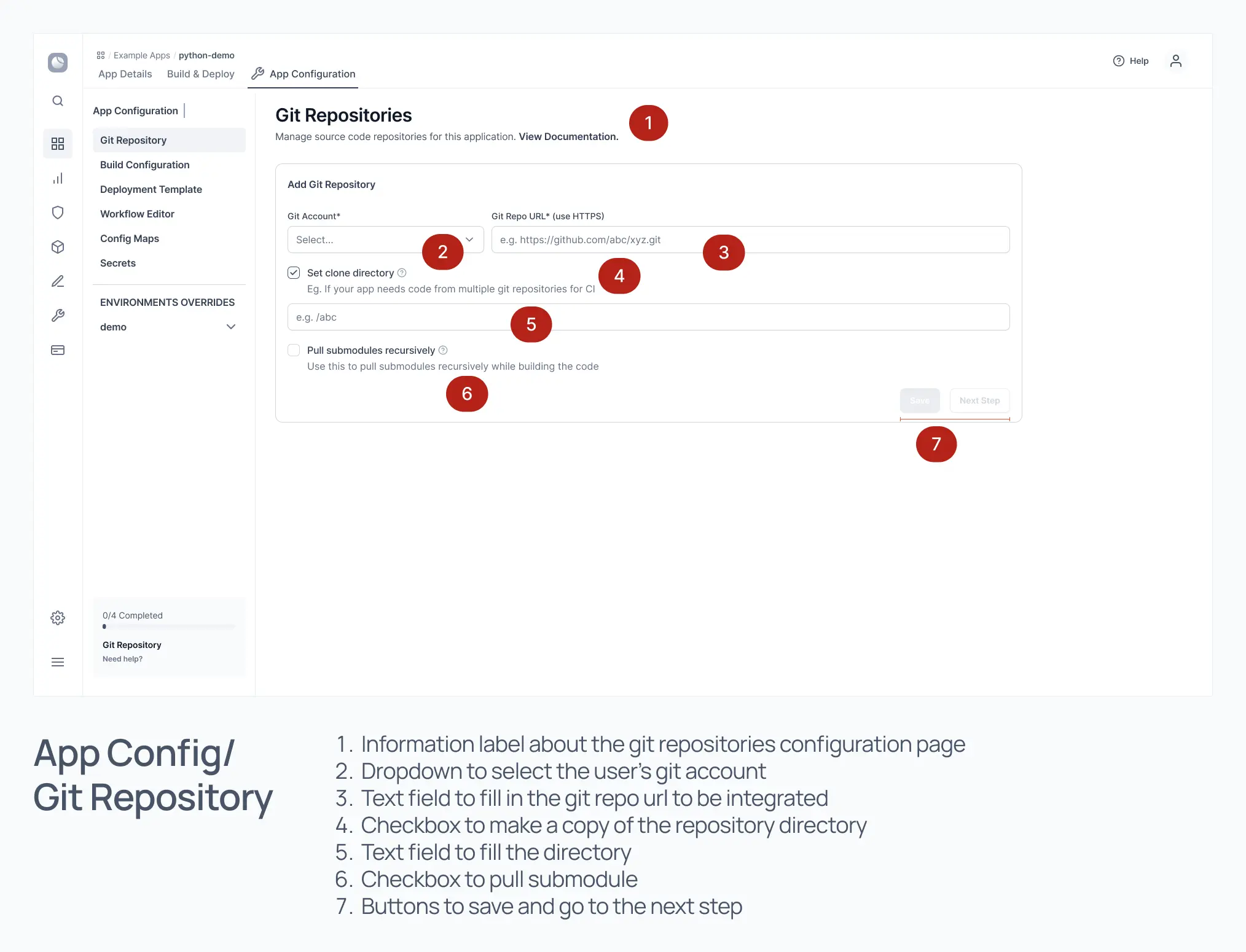
Adding git repositories
4
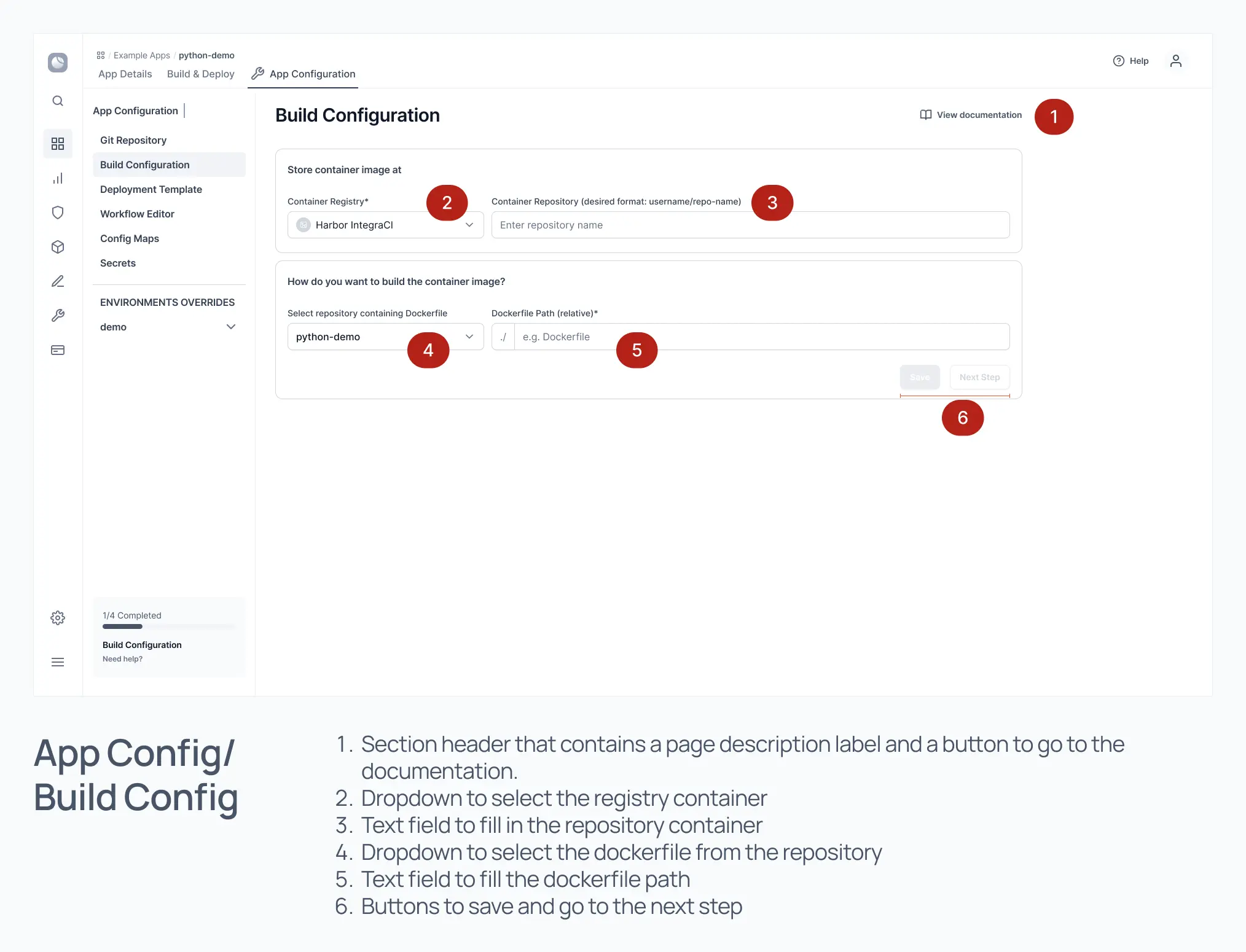
Configure the Build Pipeline
5
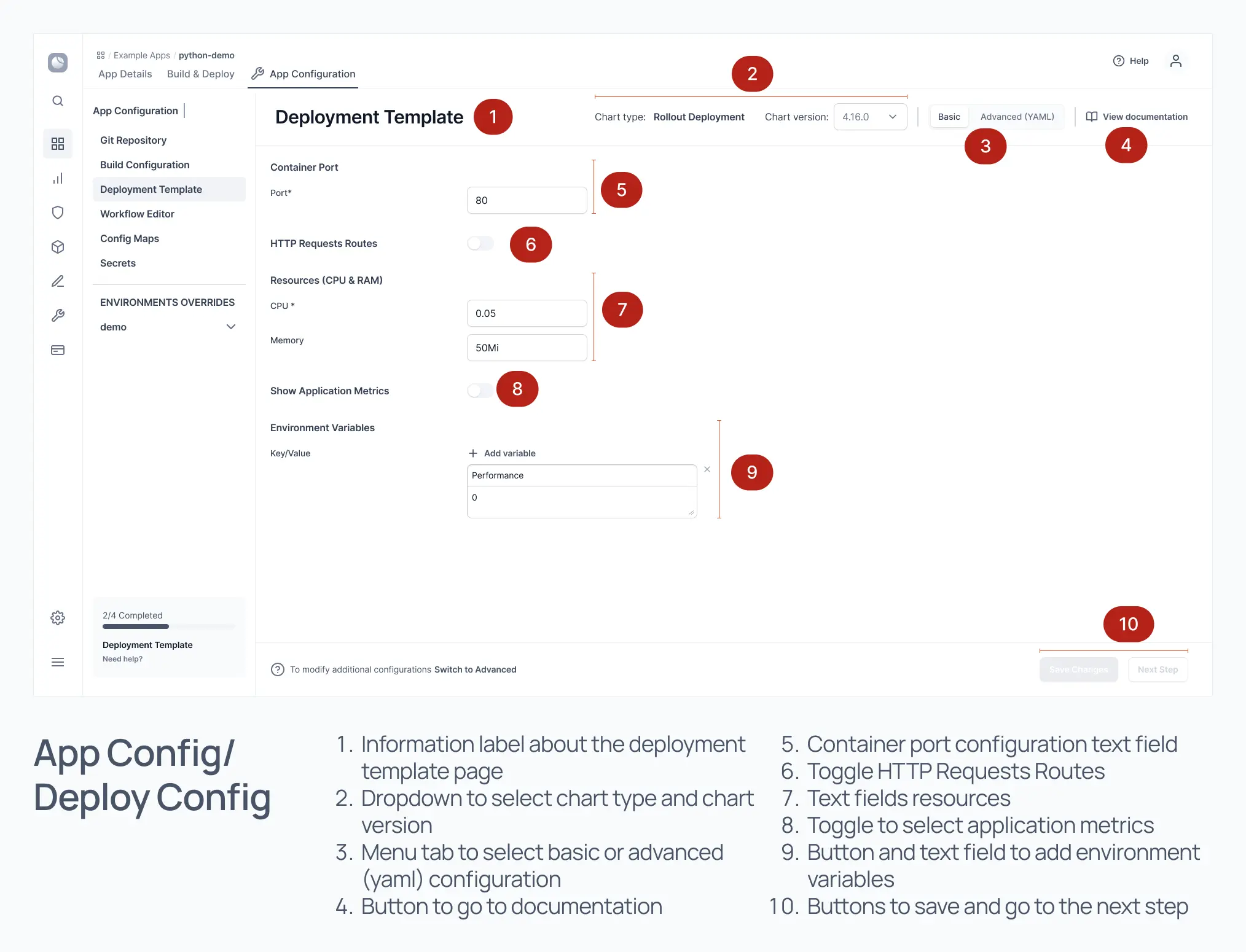
Configure the Deployment Pipeline
6
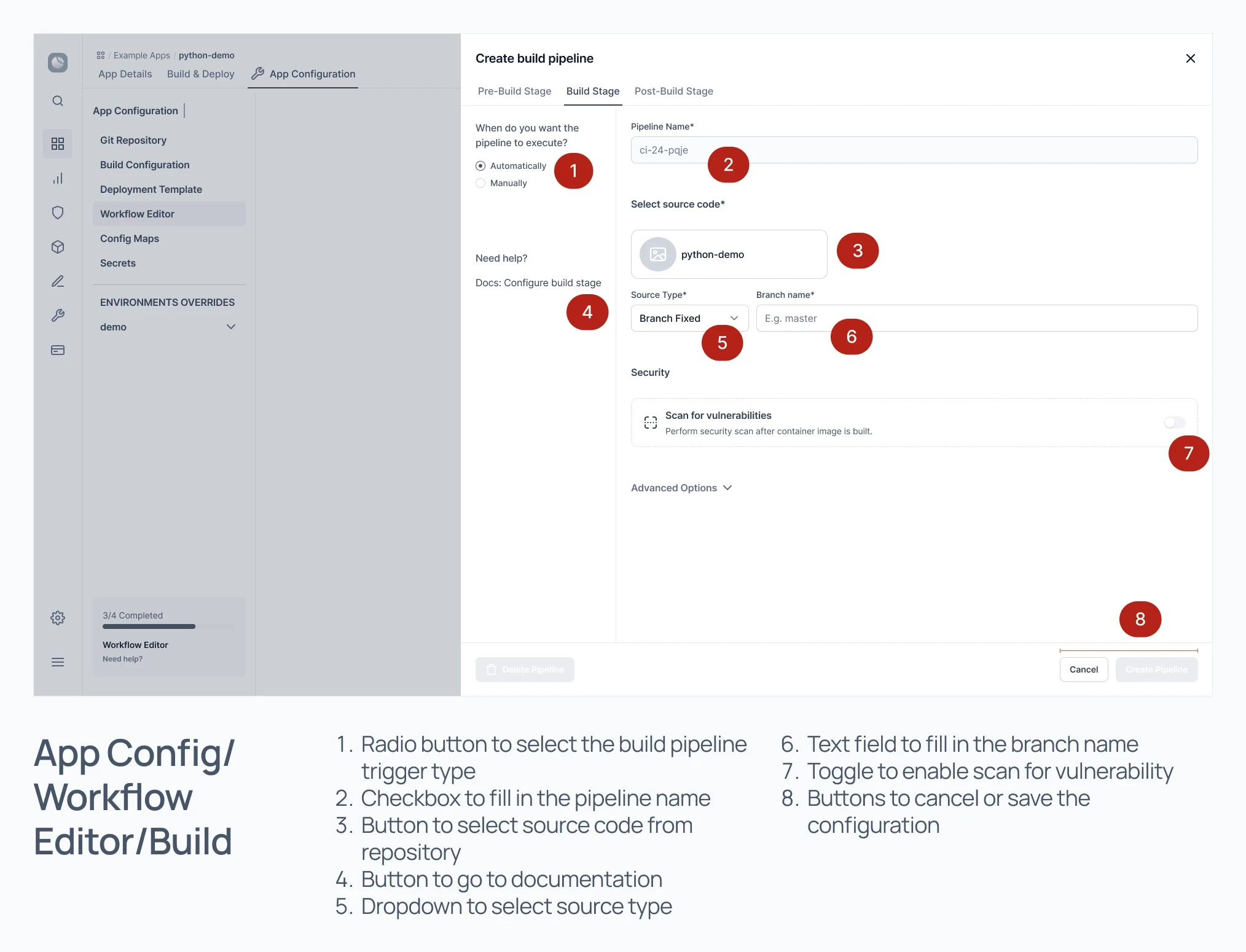
Set up the Build workflow
7
Set up the Deployment workflow
8
Run the build pipeline on the prepared workflow
9
Run the deployment pipeline on the prepared workflow
10
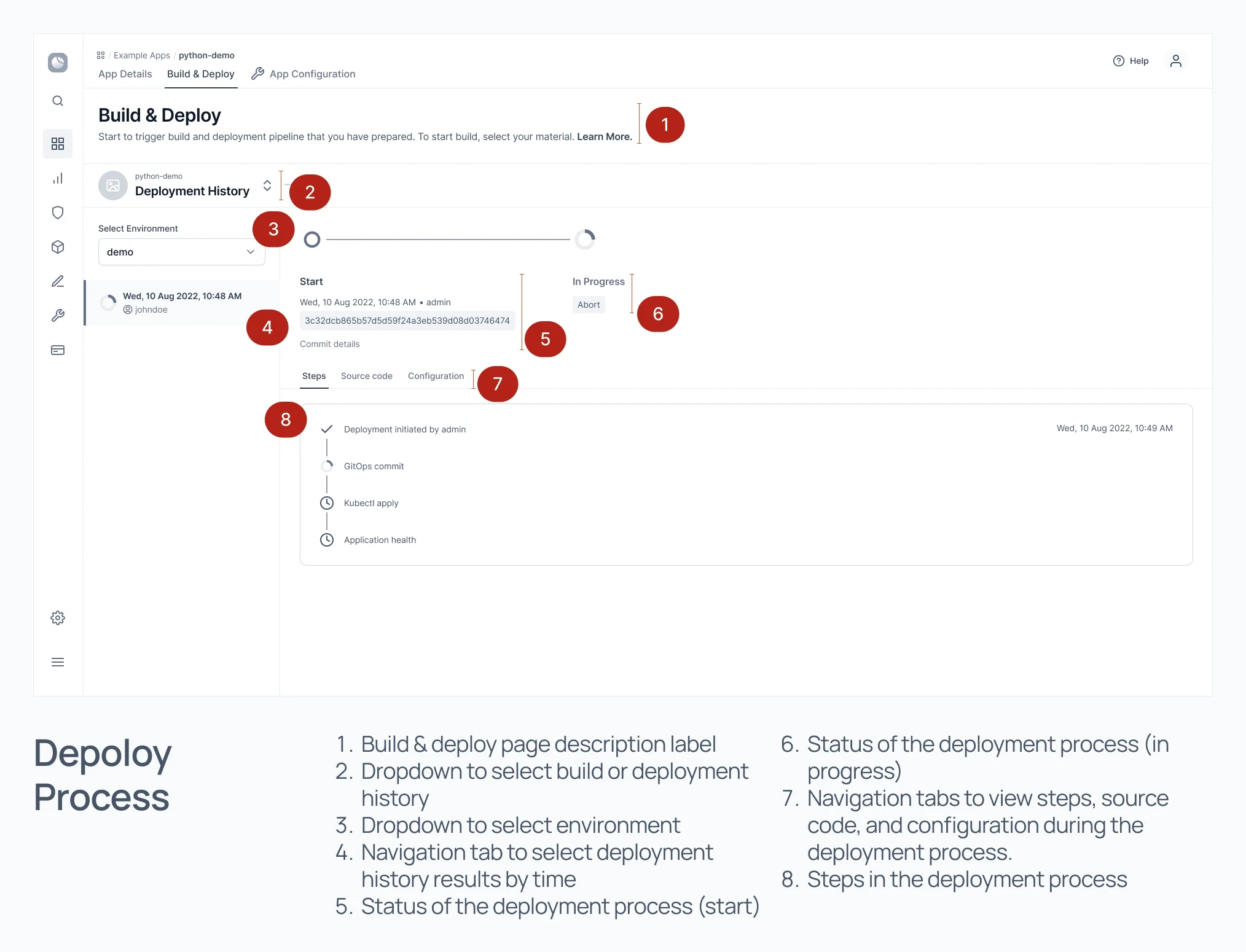
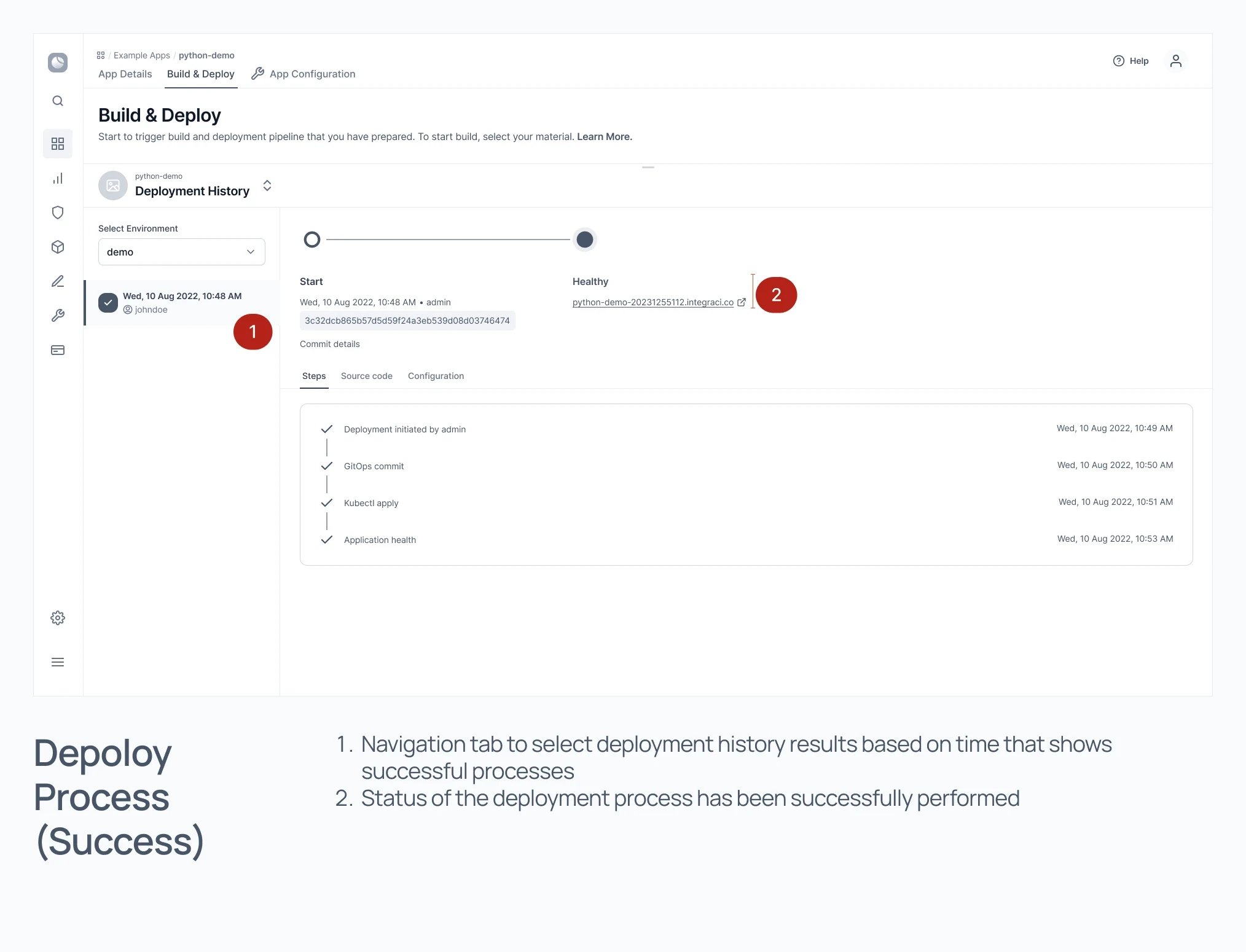
View the result of the workflow process
11
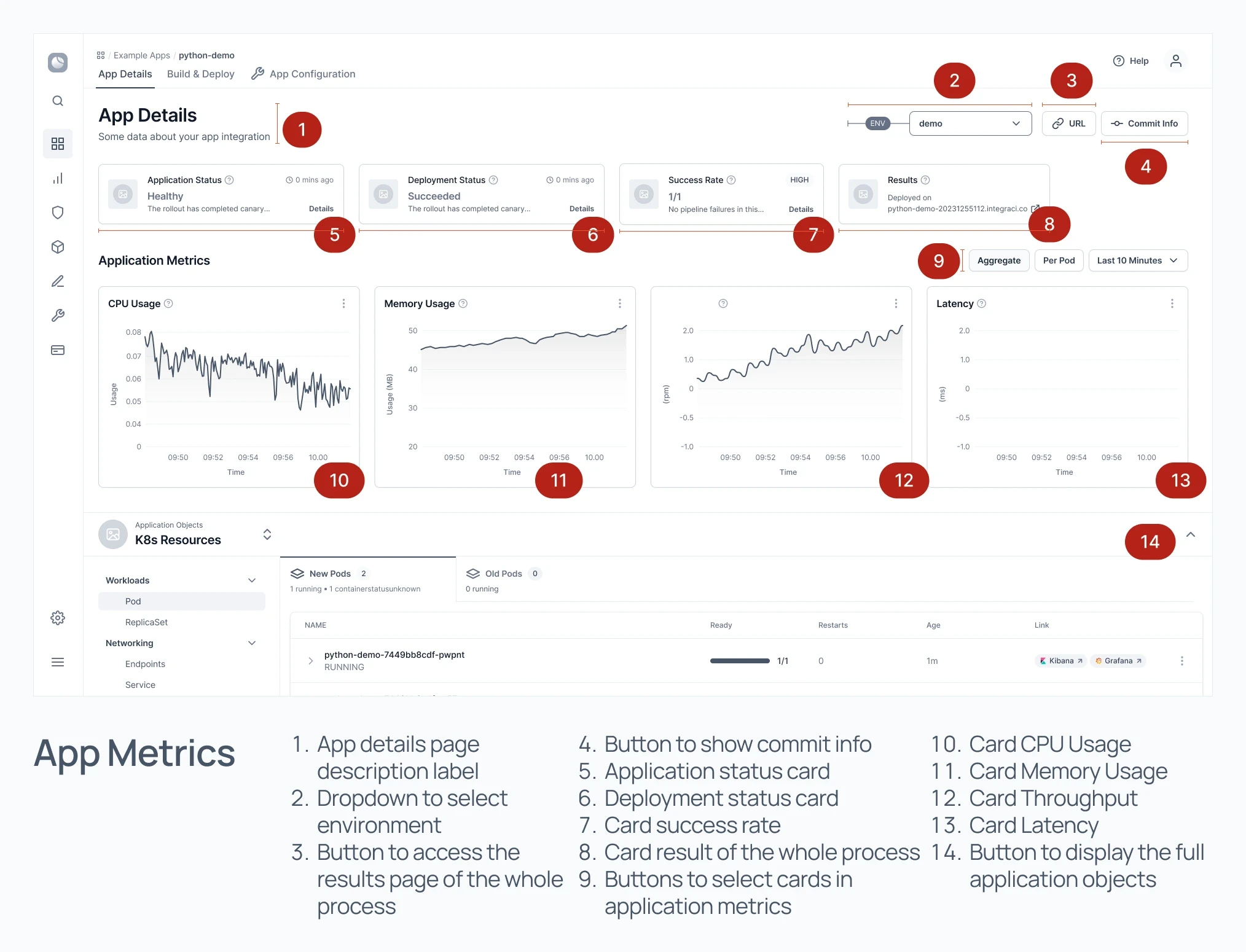
View app metrics from the integration process
12
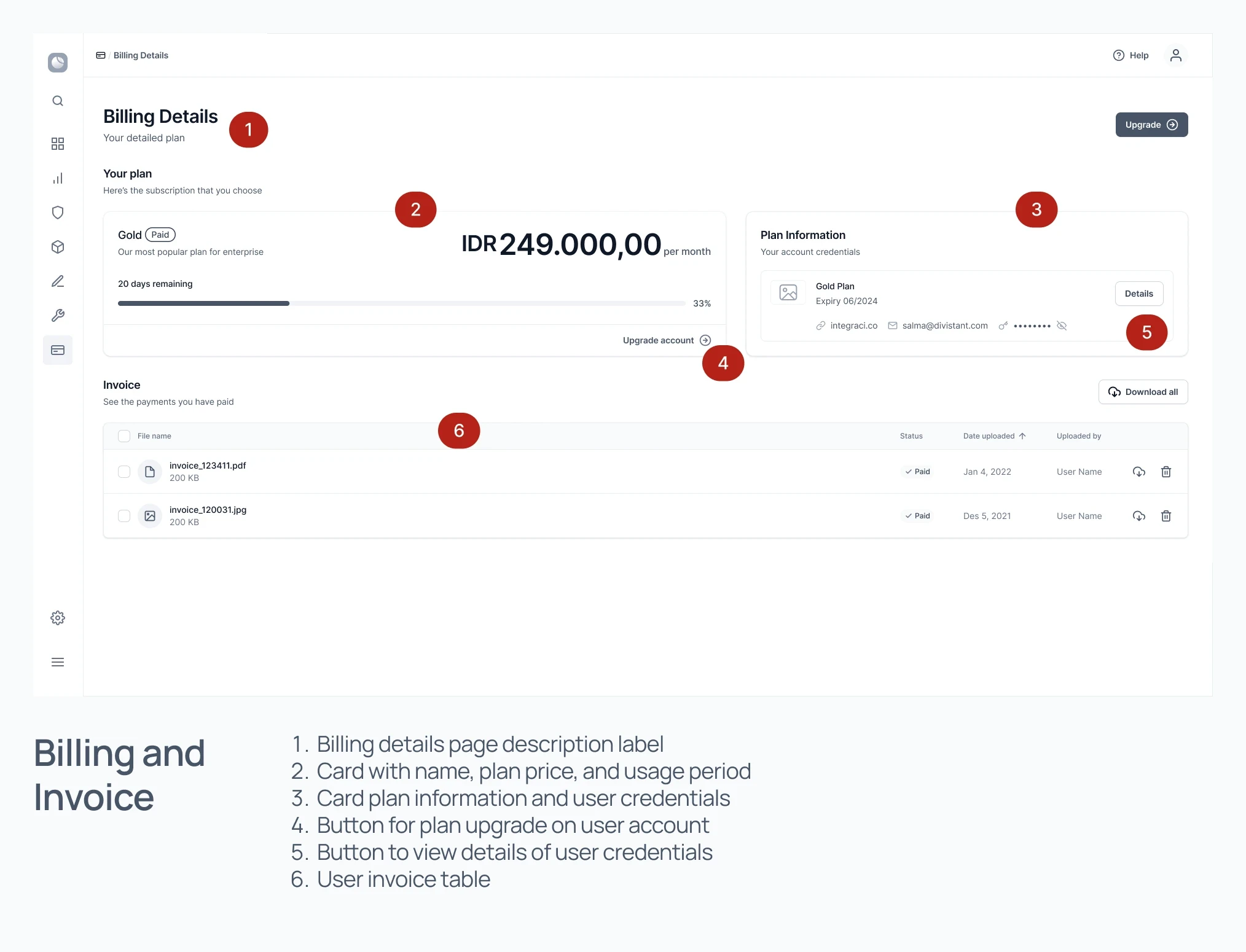
View usage billing and invoice
Information Architecture
How content are organized and presented to users
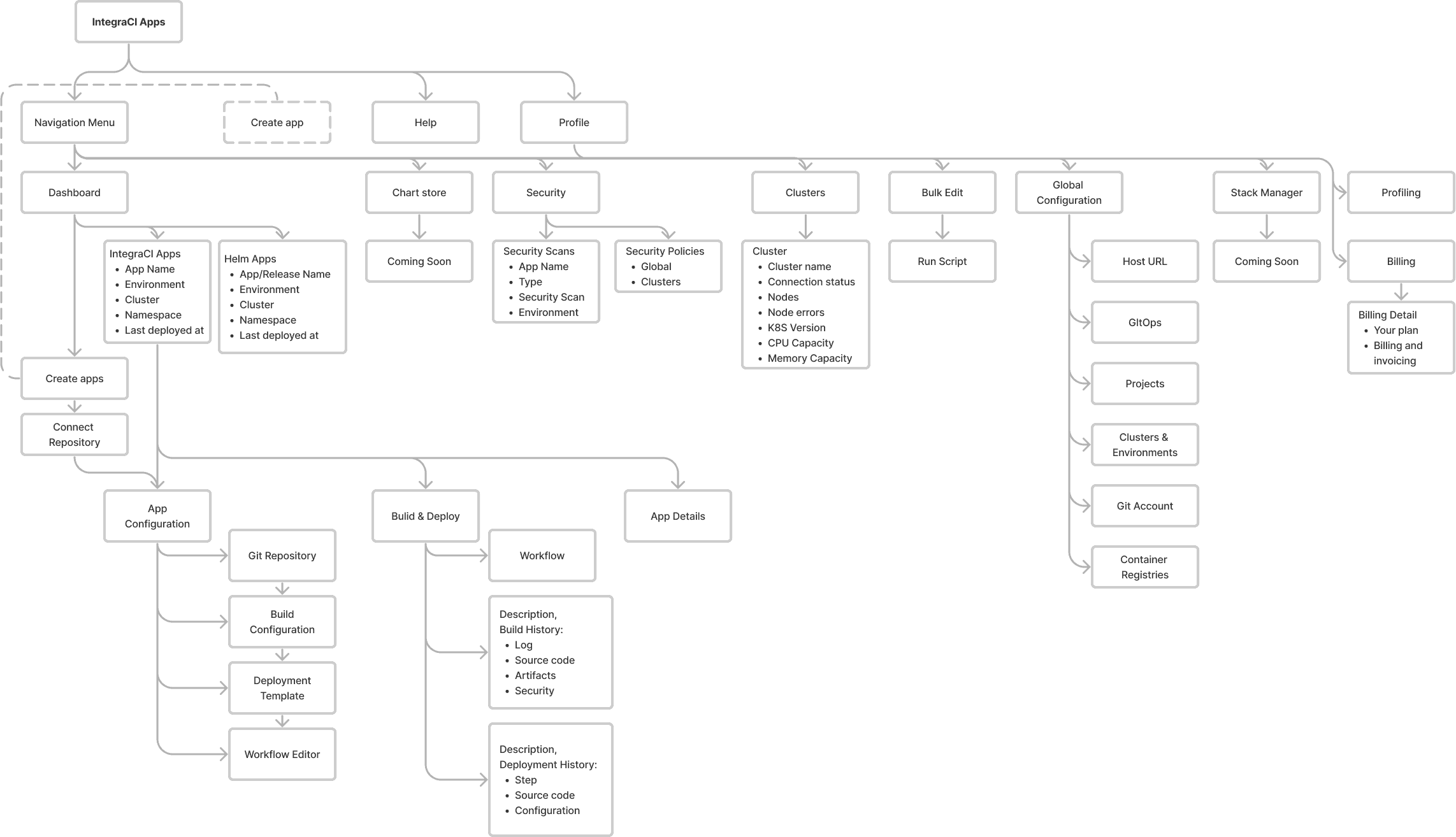
The information architecture used here is a hierarchy of menus and submenus located on the side and top navigation of the user interface. The information architecture will be a reference in the wireframing and prototyping process to navigate the menus and features available in the platform.
Wireframe
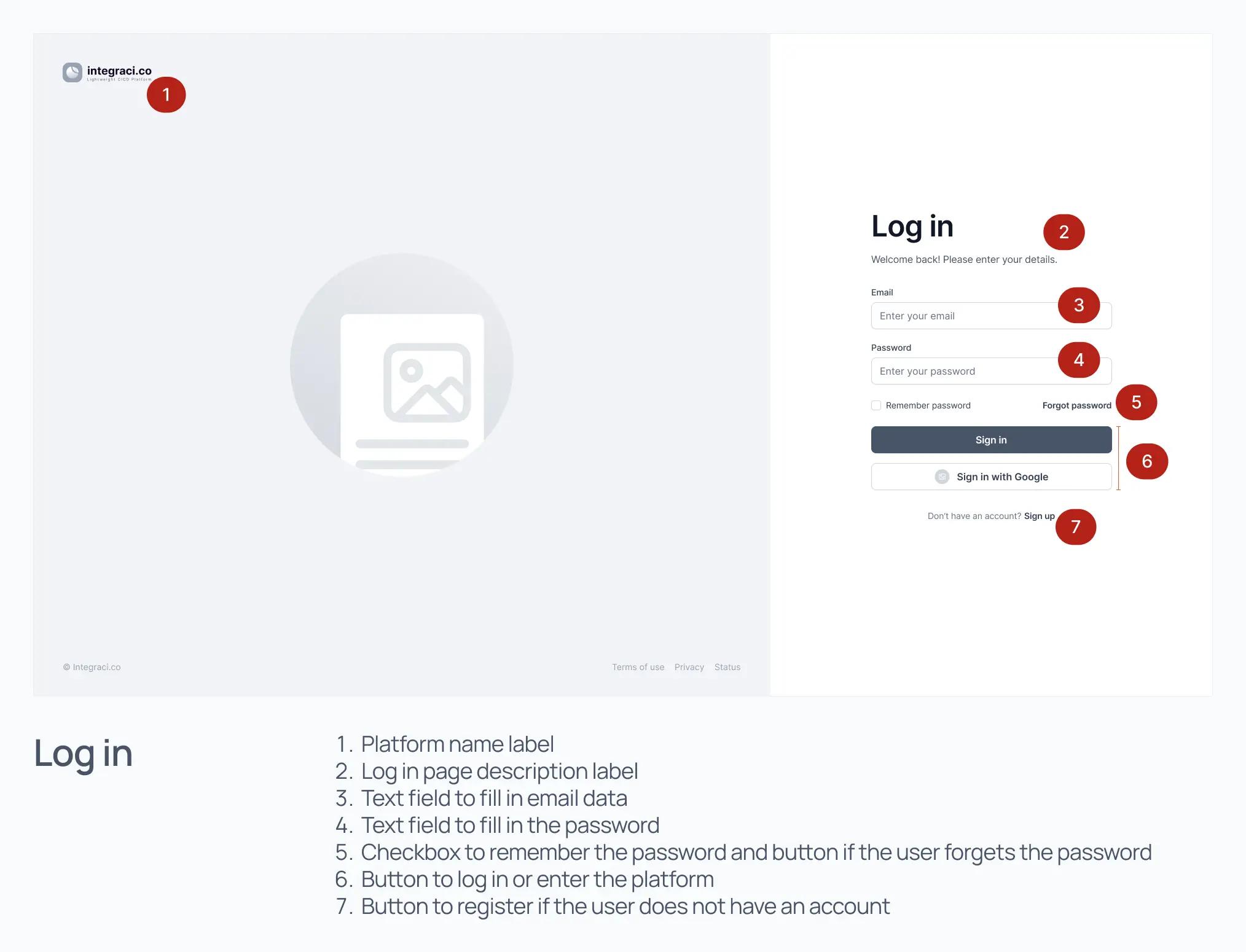
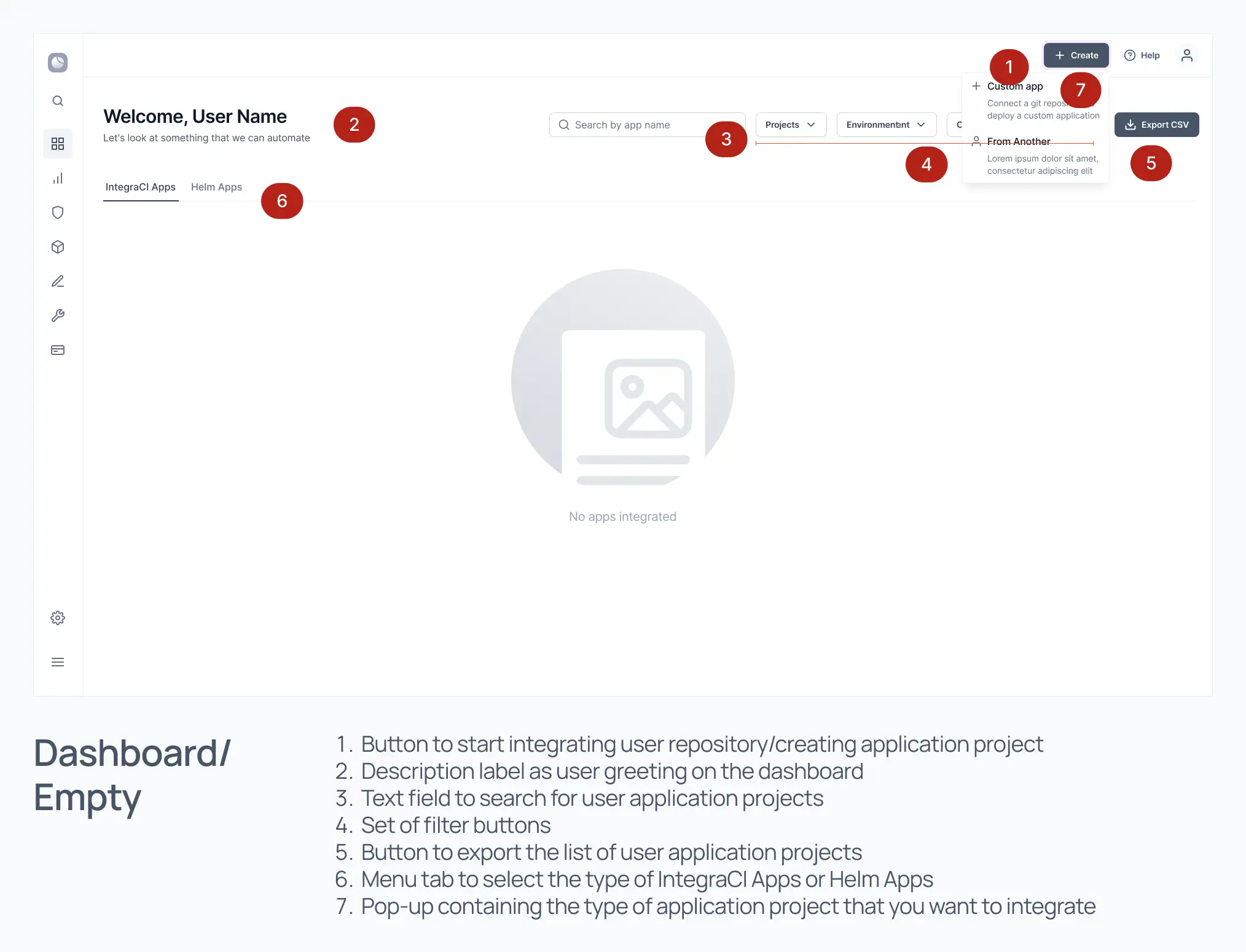
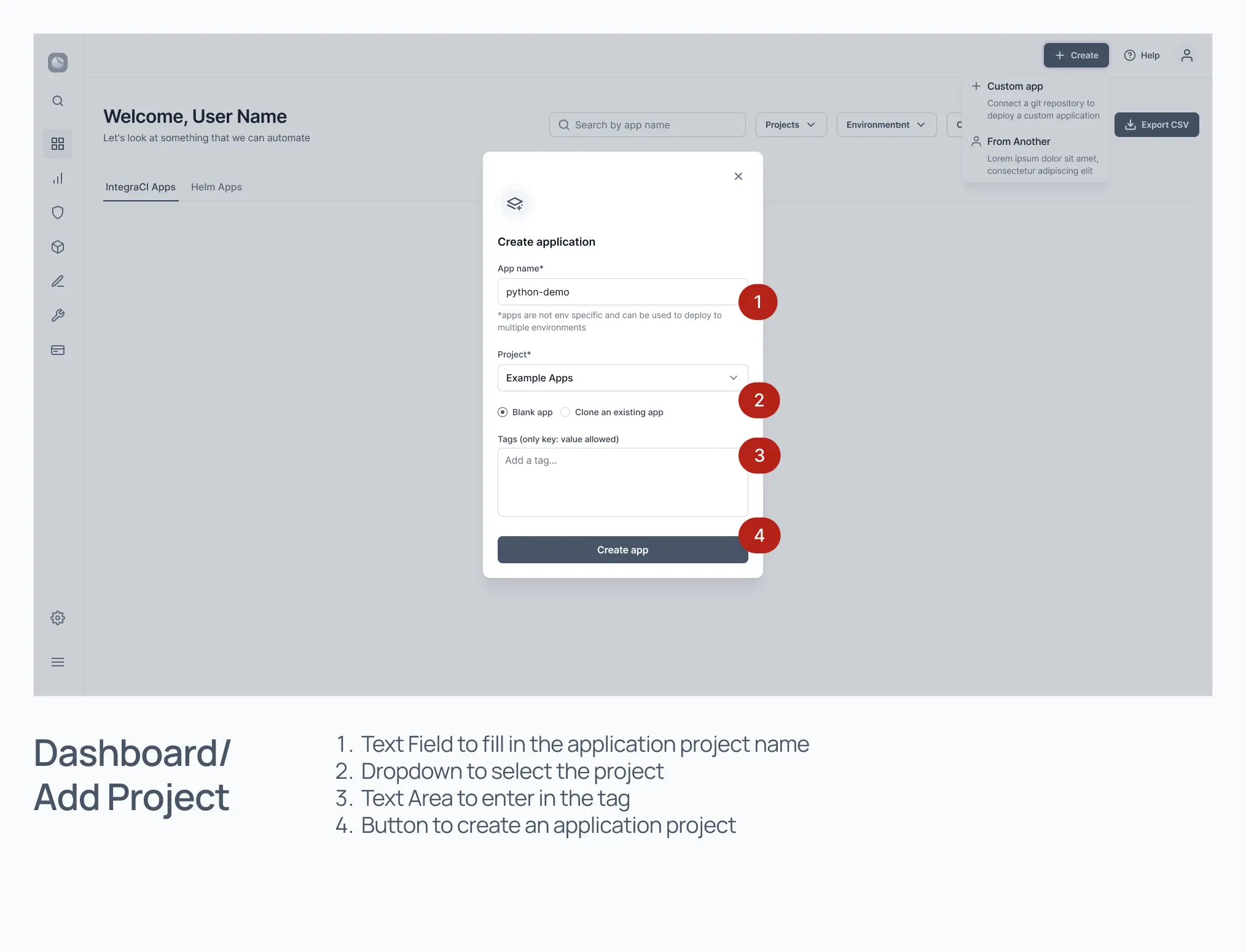
We create wireframes of what the user can see in the platform, what information the platform will provide to the user, and what kind of interaction and sequential flow of use we want to provide to the user.
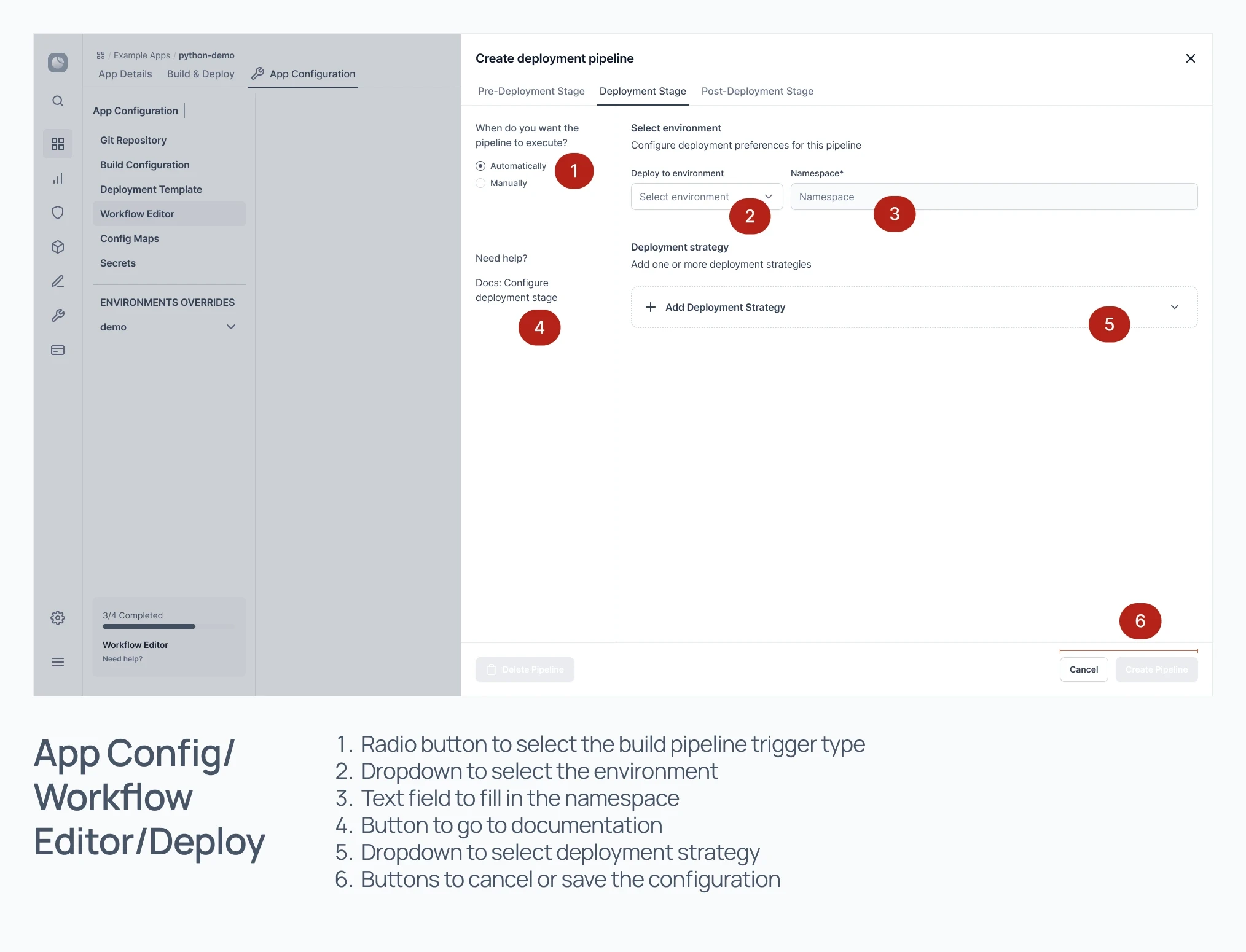
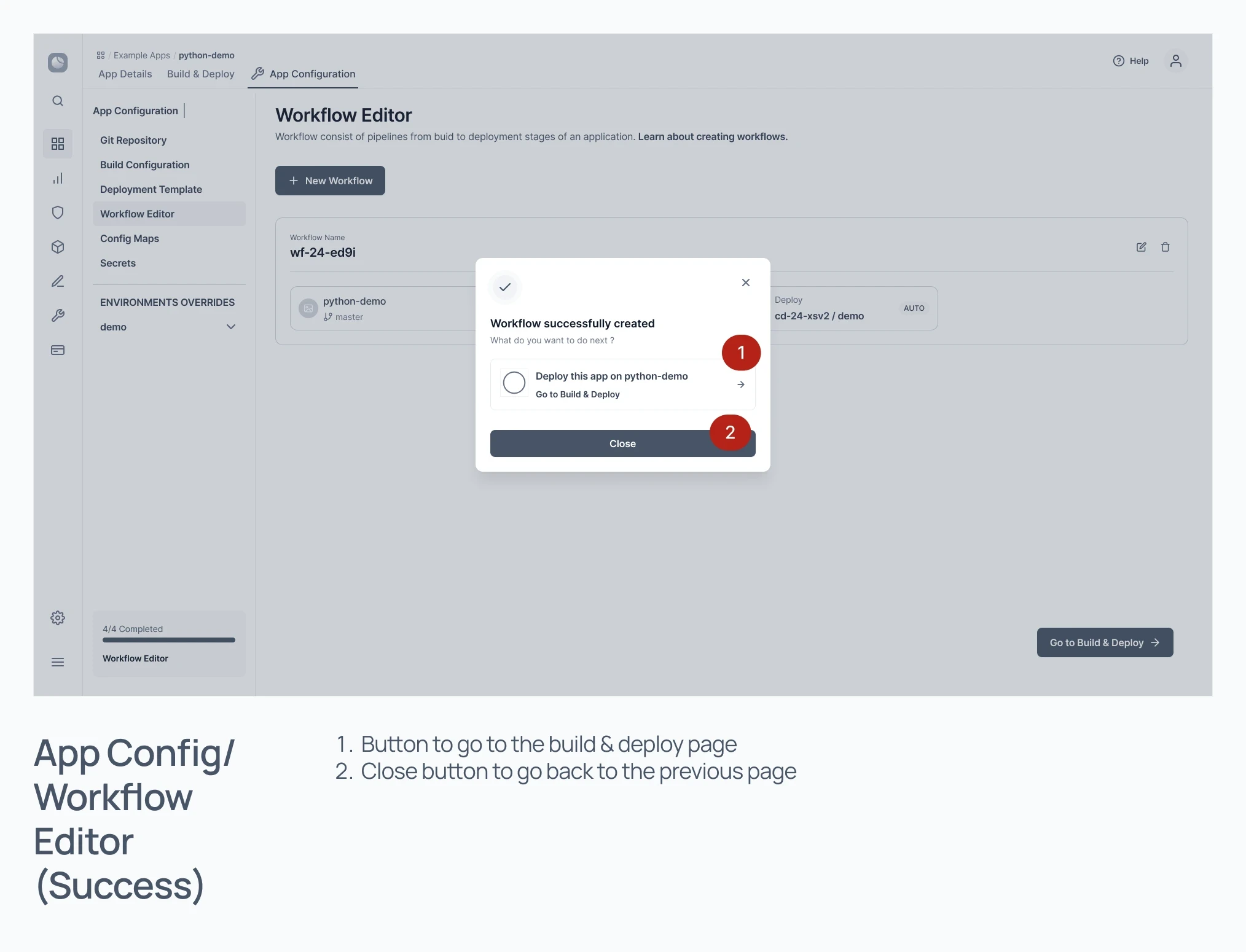
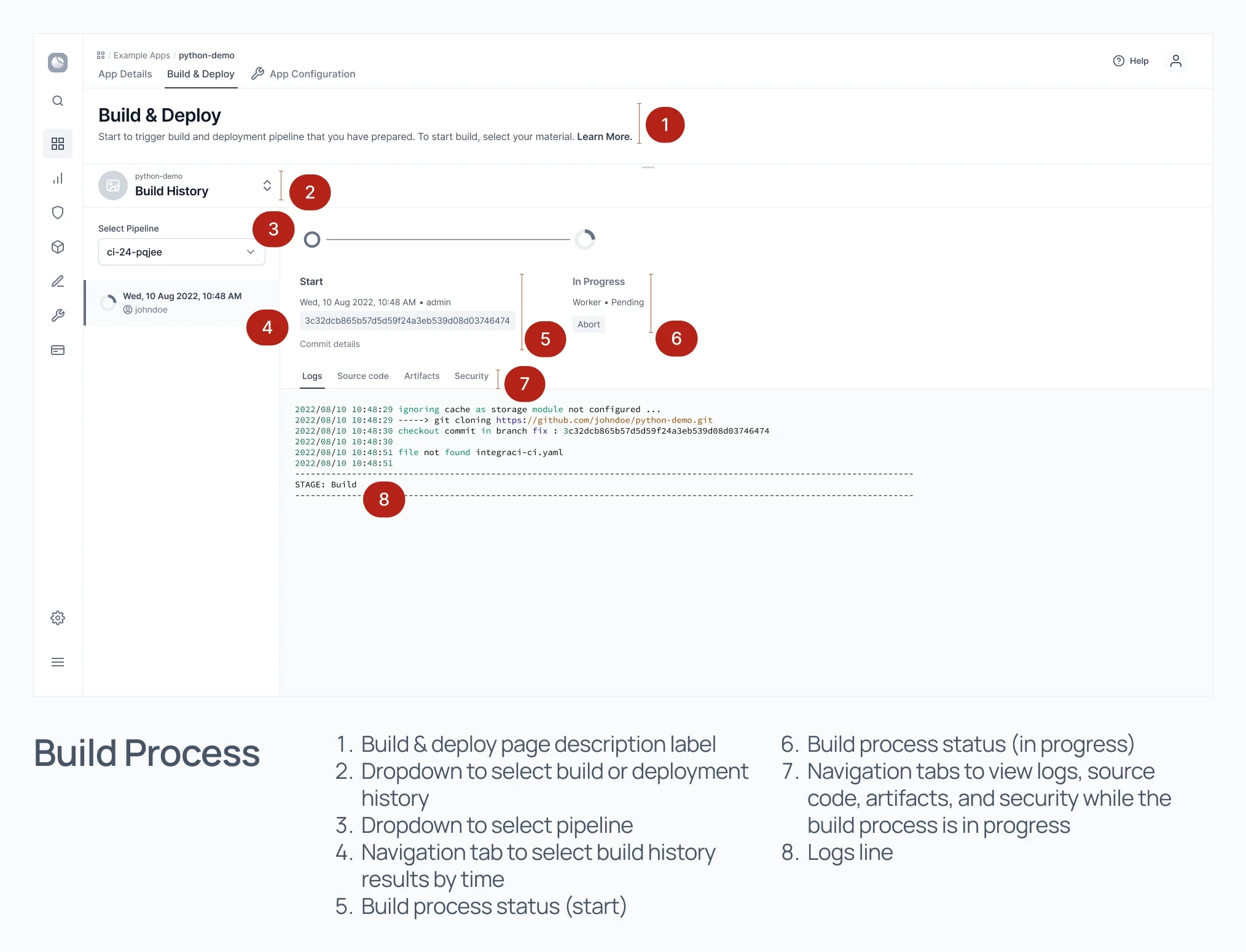
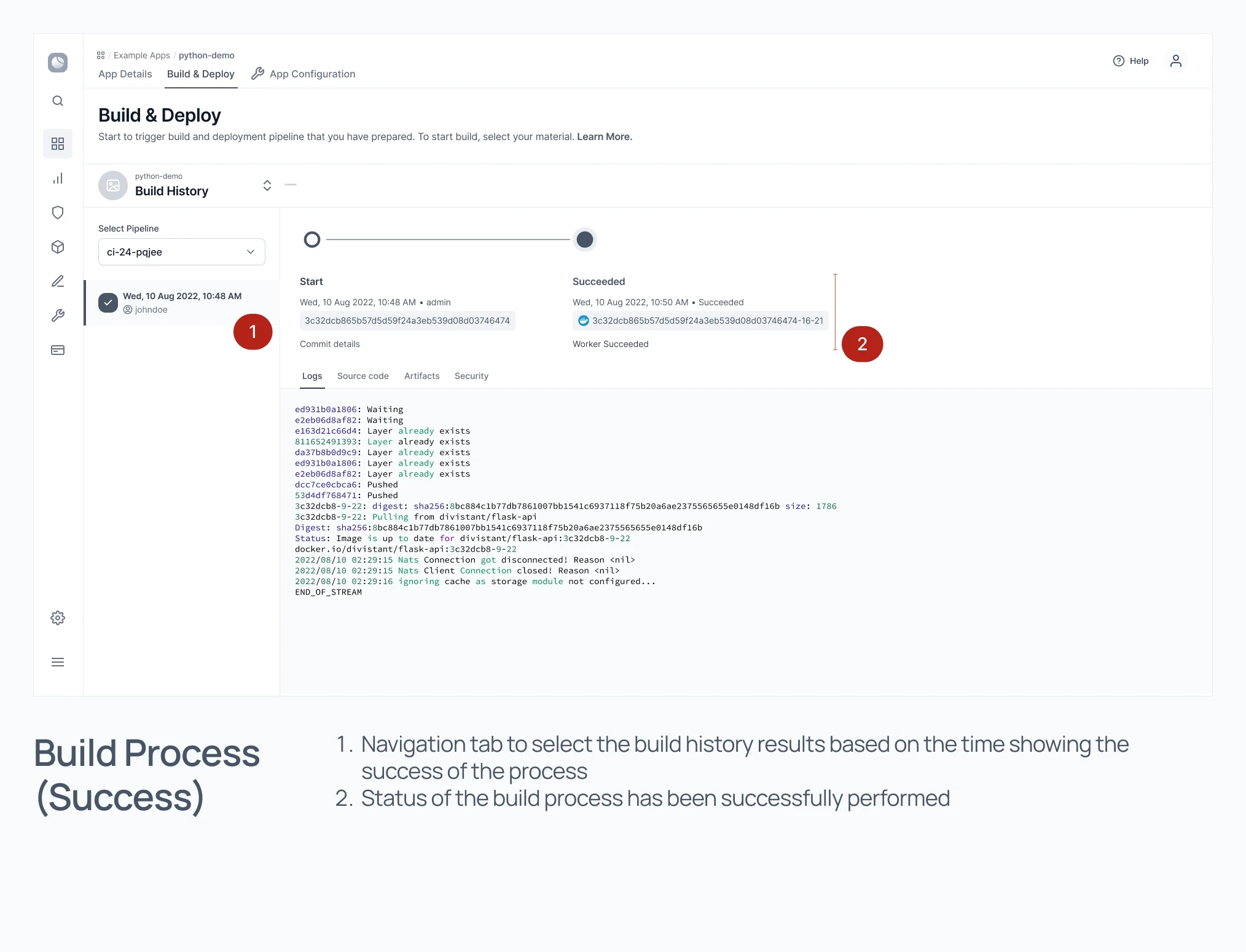
Design Evaluation

The Feedback
The techniques to evaluate the results of the solution design are usability testing and USE Questionnaire. Usability testing is carried out covering aspects of effectiveness, aspects of efficiency, and aspects of user satisfaction. The results of testing these three aspects obtained the usability value of the solution desi
Effectiveness Testing Results
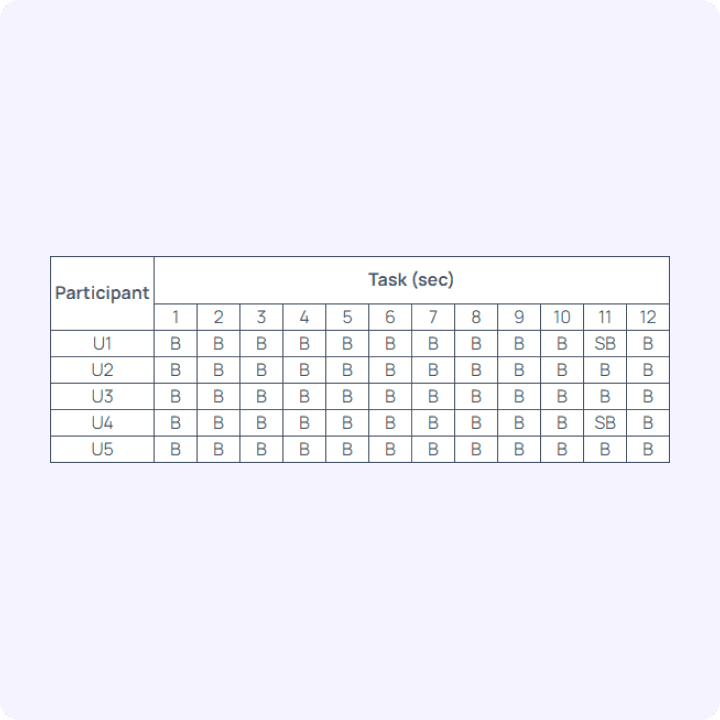
Effectiveness is measured based on the user's success in completing each task. According to Nielsen, a task is said to be successful if the user performs the task correctly and is completed. A task is partially successful if the user makes mistakes on some of the tasks given. The task is declared failed if it does not succeed in achieving the objectives of the intended task.


Efficiency Testing Results
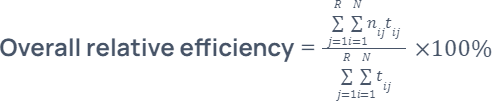
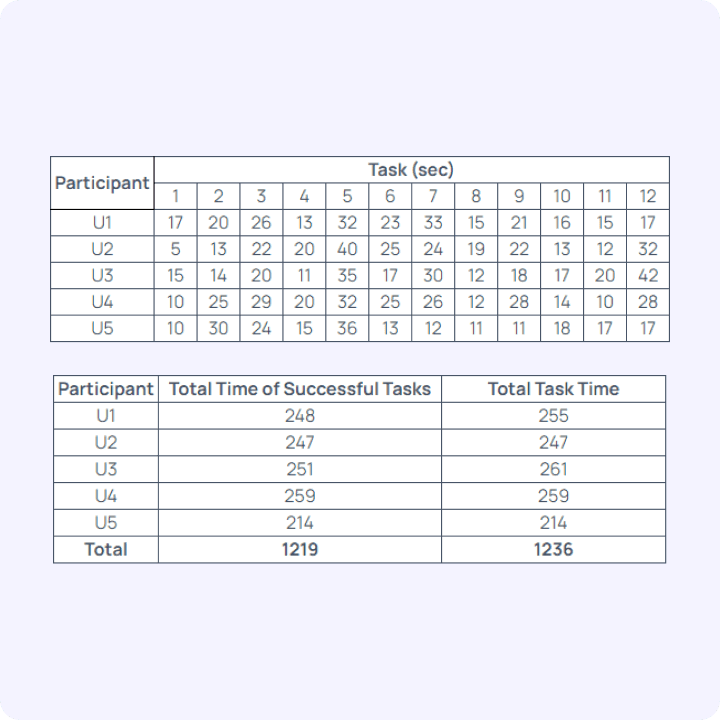
Generally, efficiency is measured in terms of time to complete a particular task (in seconds/minutes). We recorded the time taken to complete the task while participants were experimenting on the platform. Task completion time was calculated from the time the participant started working on a task until the participant completed the task or until the participant gave up on the task.

Efficiency Testing Results
We used the USE Questionnaire to measure the satisfaction of the solution design.
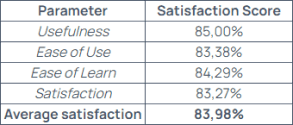
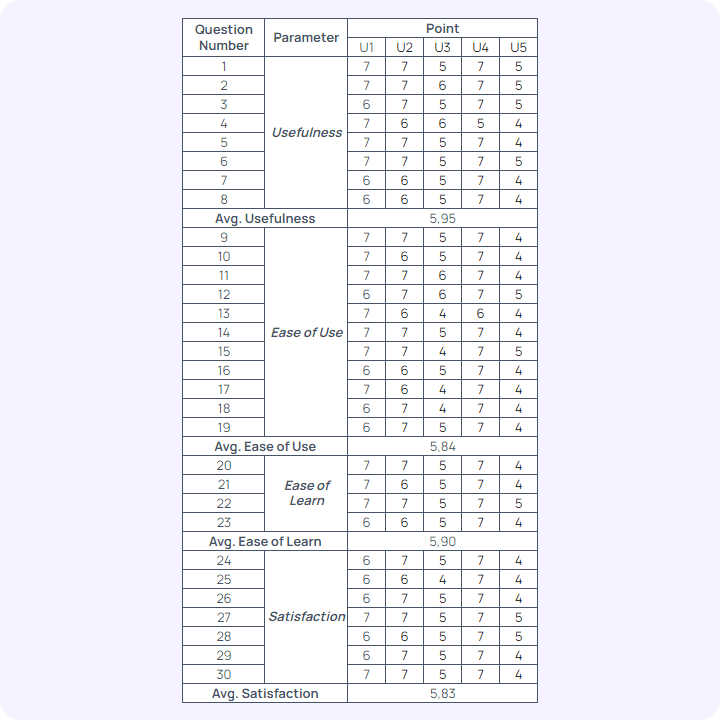
The usability score obtained from the average value of effectiveness, efficiency, and satisfaction. Thus, the usability value of the solution design of the IntegraCI platform is obtained by the following calculation:


Based on the percentage of usability values obtained, the IntegraCI platform solution design received a score of 93.62%.
Conclusion
From the existing problems, a solution has been made in the form of an automation platform to help software developers in the process of distributing and delivering software. The solution design that has been made is a design that refers to the user needs that have been obtained from the analysis and research that has been done. In addition, the testing results show that the majority of users can complete the task successfully. This means that the application design made is enough to facilitate software developers in automating the process of delivering and distributing software to the hands of users.